Passive Monitoring
Check-ins when they remember. Signals when they don't.
Most check-in apps go silent when someone forgets to tap. We don't. Even if they miss their daily check-in, the app quietly looks for signs they're still active — so you're never left guessing.
How It Works
The app runs quietly in the background and monitors three simple signals:
Phone Active
Apps being opened, screen unlocked, phone in use
Motion Detected
Phone is being moved or carried — someone is holding it
Charging
Phone plugged in or unplugged — normal daily routine
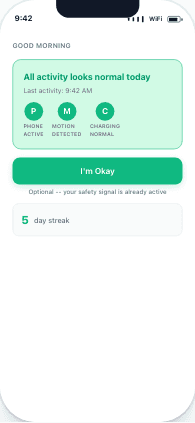
All signals green — activity looks normal
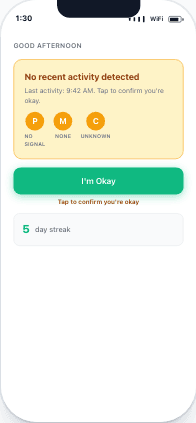
No recent activity — gentle nudge to check in
Three Activity States
All Activity Normal
Phone is being used normally. All three signals are green. Even without a manual check-in, your guardian can see you're active. The "I'm Okay" button becomes optional — your safety signal is already active.
No Recent Activity
Phone hasn't been used recently. The app gently suggests checking in: "Tap to confirm you're okay." Your guardian sees: "No activity since 9:42 AM."
Alert Sent
No activity for the configured alert threshold (default: 4 hours). On Protect Me, your emergency contact is automatically notified. You can still check in to send an "All Clear."
What Your Guardian Sees
Your guardian's dashboard shows your activity in real time — even on days you forget to manually check in.
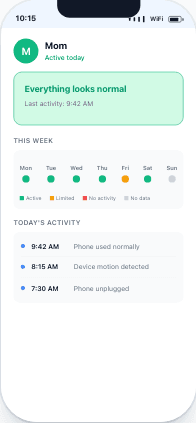
Guardian sees: activity timeline with signals
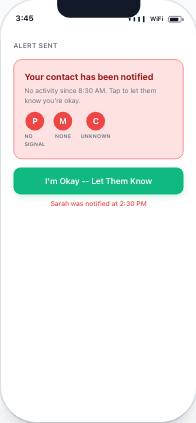
If no activity (Protect Me): contact is notified with action buttons
Settings & Control
You control everything. Passive monitoring is opt-in and fully configurable.
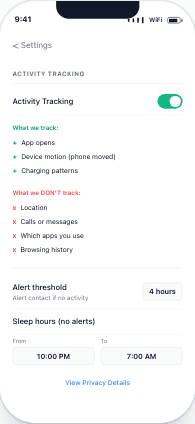
Full control in Settings
Activity Tracking Toggle
Turn passive monitoring on or off anytime in Settings.
Alert Threshold
Set how long before your contact is alerted (default: 4 hours of no activity). Contact alerting requires Protect Me.
Sleep Hours
Set quiet hours (e.g., 10 PM – 7 AM) so the app doesn't alert during normal sleep.
Privacy First
What we DO track
- ✅ App opens (binary: yes/no)
- ✅ Device motion (phone being moved)
- ✅ Charging patterns (plugged/unplugged)
What we NEVER track
- ❌ Your location (no GPS, ever)
- ❌ Calls or messages
- ❌ Which apps you use
- ❌ Browsing history
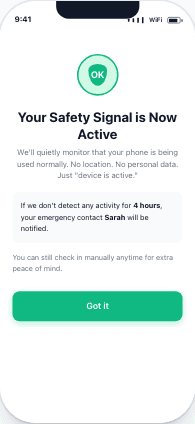
"No location. No personal data. Just 'device is active.'"
See It In Action
Try the interactive demo to see how passive monitoring works alongside daily check-ins.
Try the Demo →Common Questions
Does this drain my battery?▼
No. The monitoring uses minimal background processing. Battery impact is less than 1% per day.
Can I still check in manually?▼
Yes! Passive monitoring is an additional safety layer. You can (and should) still tap 'I'm Okay' when you remember. The two work together.
What if my phone is off?▼
No activity will be detected, which is exactly what should trigger an alert. If your phone is off for longer than the alert threshold, your contact is notified on Protect Me.
Is this available on the free plan?▼
Basic passive monitoring view is available on Lifetime ($4.99 one-time). Full passive monitoring (foreground + battery + motion signals) is on Protect Me ($29.99/year). Free plan uses manual check-ins only.
Can my guardian see exactly what apps I use?▼
No. They only see 'phone is active' or 'phone is idle.' Never which apps, what you typed, or what you browsed.
Get Started in 2 Minutes
Download I'm Alive today and give yourself and your loved ones peace of mind. It's completely free.
Free forever • No credit card required • iOS & Android